Wix Privacy Policy Template in 2026: What to Fix Before You Publish One
The real value in wix privacy policy template shows up when you debug it like a live system. A banner can render perfectly and still leak requests, misfire tags, or drift after the next plugin or theme update.
The useful test for wix privacy policy template is whether the live stack behaves correctly before consent, after consent, and after the next deployment. That is how hidden leaks and timing mistakes show up.
The deliverable is a live policy page that matches the forms, apps, pixels, email flows, and rights process your Wix site is actually running today.
Wix’s current help article is useful precisely because it admits the limit. It says “You should not rely on this article as legal advice” and warns that some third-party tracking and app behavior is “not covered by the Wix Privacy Policy.” The European Commission still says privacy information should use clear and plain language. California’s Privacy Protection Agency adds the drafting rule many teams still ignore: required notices should be easy to understand and should avoid legal and technical jargon. So in 2026, the real job is not finding a wix privacy policy template. It is turning a template into a page that matches the live stack.
If you want nearby context first, start with these guides to Wix privacy policy, privacy policy template, and Wix GDPR. This page stays narrower. It is the wix privacy policy template review I would use this week before publishing a policy on a live Wix site.
If your team is trying to get wix privacy policy template under control without adding a heavyweight privacy stack, DataShyre can help. DataShyre focuses on consent and preference management that are easier to implement, easier to operate, and easier to trust on a live site. Start with DataShyre’s consent and preference management or book a demo.
If your team wants help turning a Wix template into a policy and consent layer that still matches the live runtime three releases later, DataShyre can help with data mapping, consent management, and implementation QA. The expensive part is not writing a decent page. It is letting the page drift away from the real apps, forms, and tracking behavior.

1. Treat the template as a checklist, not as the source of truth
The first wix privacy policy template mistake is starting in the document instead of on the site.
Wix’s current guidance still points owners to the right raw ingredients:
- what information you collect;
- how you collect it;
- why you collect it;
- how you store, use, share, or disclose it;
- how visitors can withdraw consent; and
- how visitors can contact you.
That is a helpful structure.
It is not a substitute for inventory work.
Before you trust any wix privacy policy template, walk the live site and list:
- contact forms;
- newsletter or lead-gen forms;
- store, bookings, events, or members flows;
- analytics, pixels, and custom code;
- chat, maps, reviews, video, scheduling, and embedded tools;
- CRM, payment, and email integrations.
If the inventory is vague, the page will be vague too.
2. Account for the apps and services Wix explicitly says it does not cover
This is the line that matters most in practice.
Wix says that third-party services, including analytics tools and apps from the Wix App Market, may have their own policies and that those practices are not covered by the Wix Privacy Policy.
That one sentence should change how you use a wix privacy policy template.
It means the policy cannot stop with native Wix features.
You also need to review:
- third-party Wix apps;
- Google Analytics and ad platforms;
- custom scripts or tag-manager-like injections;
- video, maps, chat, booking, or calendar embeds;
- external payment or CRM tools.
If those tools collect, receive, or influence personal data, the policy should describe that in plain language instead of hiding everything behind labels like trusted partners or service providers.
This is also where many teams realize the template is not the hard part. The hard part is explaining the site honestly.
3. Make the page line up with California notice requirements, not just European wording
Many wix privacy policy template drafts over-focus on general GDPR language and under-explain what California-facing users need to see.
The CPPA’s current notice guidance says businesses subject to the CCPA must provide a Notice at Collection and a privacy policy. It says the notice should include the categories of personal information collected, the purposes, whether the information is sold or shared, the retention period for each category, and a link to the privacy policy. It also says the privacy policy should be posted through a link with the word privacy in it.
That changes the review.
For a practical wix privacy policy template, ask whether it clearly covers:
- categories of personal information collected in the last 12 months;
- sources of that information;
- the specific purposes for collecting or using it;
- whether data is sold or shared where that framing applies;
- retention periods or retention criteria;
- how people exercise their rights.
If your Wix site uses forms, checkout, bookings, or embedded tools that collect different categories of data across different journeys, the template should not flatten them into one generic paragraph.
4. Keep the template aligned with the real tracking layer
A wix privacy policy template is not only a text page about forms.
It also has to match what the site is doing with cookies and similar technologies.
Wix’s help content tells site owners to explain what tracking tools they use, what personal information those tools gather, and why they are used. On the UK side, the ICO published final storage-and-access technologies guidance on April 29, 2026, and said that the guidance covers cookies, tracking pixels, device fingerprinting, and similar technologies.
So before you approve a wix privacy policy template, compare it against:
- the cookie banner or Privacy Center choices;
- analytics and advertising tags;
- embedded third-party tools;
- custom code snippets;
- any mismatch between the template language and the runtime behavior.
If the page says we use cookies to improve experience while the live stack is also running marketing pixels, cross-site measurement, or vendor embeds, the template is already stale.
This is where our website privacy checker often becomes more useful than another drafting pass. If the runtime and the policy disagree, the runtime wins.
5. Write rights, withdrawal, and contact paths like an actual workflow
Another common wix privacy policy template problem is writing a polished rights section that the business cannot actually support.
The European Commission still says consent requests should be clearly distinguishable, specify what personal data is used for, and explain the possibility of withdrawal. Wix’s own article says you must explain how site visitors can withdraw consent, delete or change collected information, and contact the business through valid channels.
So a serious wix privacy policy template should let a normal person answer:
- who do I contact;
- which channel is valid;
- what can I ask for;
- how do I withdraw consent where consent applies;
- what happens when the data also sits in connected apps or downstream tools.
If the page promises deletion, access, or correction, but your Wix setup has no clean routing path for those requests, the template is saying more than the operation can deliver.
6. Put the policy where users can actually find it
California’s Online Privacy Protection Act still requires covered operators to conspicuously post a privacy policy. Wix’s current footer guidance also tells site owners to create dedicated policy pages and link them from the footer so visitors can access them easily across the site.
That makes the visibility rule pretty simple.
For a live wix privacy policy template review, check that:
- the policy has its own page and stable URL;
- the footer link uses obvious wording such as
Privacy Policy; - the link appears site-wide on mobile and desktop;
- collection pages also give users an easy path to the policy when they need it;
- the page is readable on smaller screens and not buried behind confusing navigation.
This is where template work turns into delivery work.
7. Re-check the template every time the site changes
The last wix privacy policy template mistake is assuming the page stays accurate after launch.
Wix itself recommends informing users that the policy may be changed or updated. That matters because Wix sites change fast:
- a new app gets installed;
- a form changes fields;
- a marketing pixel appears;
- a booking or checkout flow changes;
- a new embed starts collecting data;
- a rights-handling email address changes.
The safest operating model is to treat the policy like a release artifact.
Re-check it whenever the data flow changes, not only when someone remembers the footer exists.
A practical 7-step Wix privacy policy template review for this week
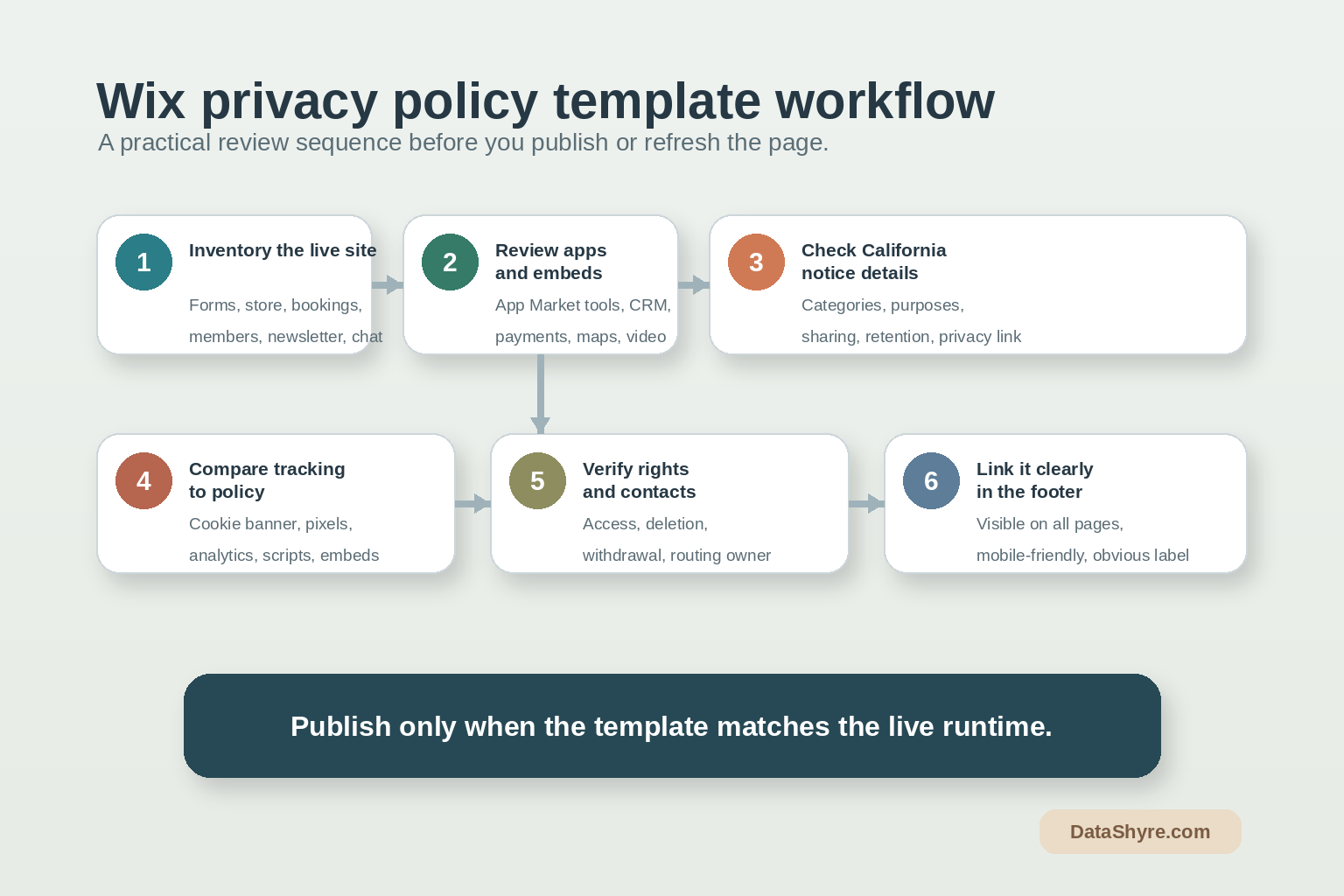
If you were reviewing a wix privacy policy template today, use this order:
- inventory the live Wix collection points before editing the draft;
- list every third-party app, script, and embed that touches personal data;
- match California notice details to the actual collection journeys;
- compare policy language against the live tracking layer;
- verify rights, withdrawal, and contact paths are operational;
- confirm the page is easy to find site-wide and near collection points;
- tie policy review to launches so the page stays current.
That gives you a much better result than copying a stock page into Wix and hoping the rest of the stack quietly agrees.
FAQ
Does Wix provide a complete privacy policy template for my business?
No. Wix provides guidance and examples, but your page still has to describe your own collection, apps, tracking, sharing, retention, and rights process accurately.
Is a Wix privacy policy template enough by itself for California or GDPR compliance?
No. The page matters, but it also has to match the live forms, notices, consent controls, tracking behavior, and operational rights workflow on the site.
Should a Wix privacy policy be separate from terms and conditions?
The fastest way to judge wix privacy policy template is to test it the way a broken deployment would expose it: before consent, after consent, and again after a stack change.
Official sources used
- Wix Help Center: Creating a Privacy Policy
- Wix Help Center: Adding Your Privacy Policy or Terms and Conditions to Your Site’s Footer
- European Commission: Information for individuals
- ICO: How should we draft our privacy information?
- ICO: Final storage and access technologies guidance published
- California Privacy Protection Agency: What General Notices Are Required By The CCPA?
- California DOJ: How to Read a Privacy Policy