What Are Cookies on a Website in 2026? Plain-English Guide to What They Do and What to Check
The real value in what are cookies on a website shows up when you debug it like a live system. A banner can render perfectly and still leak requests, misfire tags, or drift after the next plugin or theme update.
The useful test for what are cookies on a website is whether the live stack behaves correctly before consent, after consent, and after the next deployment. That is how hidden leaks and timing mistakes show up.
The practical review is not minor anymore.
In 2026, a serious answer to what are cookies on a website has to explain at least four things at once:
- what the cookie helps the website do;
- whether the cookie is necessary or mainly for analytics or advertising;
- whether another company gets access to the resulting data; and
- whether consent, opt-out, or browser controls actually change the live behavior.
If you want the adjacent explainers first, start with browser cookies, third party cookies, and website privacy checker. This page stays narrower. It answers what are cookies on a website in plain English and then ties that answer to the live checks that matter now.
If your team is trying to get what are cookies on a website under control without adding a heavyweight privacy stack, DataShyre can help. DataShyre focuses on consent and preference management that are easier to implement, easier to operate, and easier to trust on a live site. Start with DataShyre’s consent and preference management or book a demo.

1. Start with the plain-English definition
The core idea behind what are cookies on a website is still simple.
MDN’s current cookie glossary says a cookie is a small piece of information left on a visitor’s computer by a website through the web browser. The ICO’s 2026 storage-and-access-technologies materials describe cookies as small text files that a web server can cause the user’s device to store and send back later.
That mechanism lets a website remember useful things like:
- that you are signed in;
- what language or region you chose;
- what is in a shopping cart;
- whether you already closed a notice; or
- which settings you picked last time.
So the cleanest answer to what are cookies on a website is not they are always harmless or they are always bad.
It is they are browser memory that a website can use for very different purposes.
2. How a website cookie actually works
The next useful step is to explain how the website creates the cookie in the first place.
MDN’s current HTTP references say the server can send one or more Set-Cookie headers, and the browser can later send stored cookies back in the Cookie request header. Cookies can also be written from JavaScript in some cases through document.cookie.
That matters because what are cookies on a website is not only a privacy question. It is also a runtime question.
If a website relies on cookies for session state, the browser may use them to:
- keep the user authenticated;
- remember a checkout session;
- preserve a consent choice;
- keep a site preference active; or
- link a later request to an earlier visit.
The important point is that the mechanism itself is neutral.
The real privacy question starts when you ask what purpose the website is pursuing with that memory.
3. Separate necessary website cookies from optional tracking cookies
This is where most people are really headed when they search what are cookies on a website.
They usually do not just want the definition.
They want to know which cookies help the website function and which cookies mainly support measurement, advertising, profiling, or personalization.
A practical website-cookies review normally separates them into groups like:
- necessary or security cookies for login, fraud prevention, load balancing, or checkout state;
- preference cookies for settings like language, region, or remembered choices;
- analytics cookies for visit and behavior measurement; and
- advertising or targeting cookies for cross-context recognition, attribution, or profiling.
The FTC’s consumer guidance still explains that websites and apps may track people with cookies or pixels to save preferences, keep items in a cart, or target advertising later.
This is why the useful version of what are cookies on a website is really:
What is this website remembering, why is it remembering it, and does the user expect that purpose?
4. Session cookies and persistent cookies are not the same thing
Another common misunderstanding is assuming all website cookies behave the same way over time.
They do not.
Chrome DevTools still shows whether a cookie is a session cookie or carries an expiry date or Max-Age. Firefox’s current support materials also describe cookies that keep logins and preferences while explaining how its protections limit cross-site tracking.
For what are cookies on a website, that timing question matters because a short-lived session cookie serving a requested login flow is very different from a longer-lived identifier used for measurement or ad-tech recognition.
So for any live website-cookie review, ask:
- does the cookie disappear at session end;
- if it persists, how long does it last;
- why does it need to last that long; and
- does that duration still match the purpose claimed by the website?
5. Website cookies are not only a first-party versus third-party story
You will often hear what are cookies on a website answered by separating first-party cookies from third-party cookies.
That distinction still helps, but it is not the whole analysis.
The ICO’s current guidance says a third party means a domain other than the one the person is visiting, while also stressing that first-party versus third-party is not the main consideration for privacy and data protection purposes.
That warning matters because a website can look simpler if you only count classic third-party cookies, while the actual data flow still involves:
- analytics vendors;
- ad-tech scripts;
- embedded video or chat tools;
- pixels or link decoration; or
- fingerprinting or other storage-and-access technologies.
So when someone asks what are cookies on a website, I would not stop at who set it.
I would also ask:
- who receives the data;
- what purpose the cookie supports;
- whether another technology is doing the same job under a different name; and
- whether the website would still work if that cookie were blocked.
6. The legal and practical rule changes by region
This is where what are cookies on a website turns from a browser question into a compliance question.
EU and UK branch
The European Commission’s current guidance says valid consent should use “clear and plain language” and withdrawal should be “as easy to use as giving consent.” The ICO’s finalized guidance from April 29, 2026 also makes clear that the rules now cover a broader group of storage-and-access technologies beyond classic cookies alone.
That means many optional analytics, advertising, personalization, or cross-site tracking cookies on a website still need a prior-consent path in EU or UK contexts unless an exception applies.
California branch
California often changes the practical question.
The California Department of Justice says the Global Privacy Control is a “stop selling or sharing my data switch” available in some browsers and extensions, and covered businesses must honor it as a valid opt-out request where the law applies.
So for many California-facing website-cookie reviews, the useful question is less about whether the banner looks polished and more about whether:
- the notice is present;
- the opt-out path works;
- GPC is honored where required; and
- the downstream sharing behavior actually changes.
This is why a copied banner can still fail live review.
7. Website cookies are still part of active enforcement
This topic is not just theoretical.
On October 22, 2026, the CNIL fined FNAC DARTY PARTICIPATIONS ET SERVICES and FNAC DIRECT 7 million euros over a tracker used in a mobile application without prior consent. The CNIL said the tracker collected browsing-history information to display personalized recommendations and train the recommendation algorithm, and that the use did not qualify for the relevant exemption.
That matters for what are cookies on a website because it reinforces two practical points:
- regulators are still looking at the actual purpose and effect of trackers; and
- replacing one visible cookie pattern with another technical method does not remove the need for a valid consent or rights path.
A practical 7-step website-cookies review
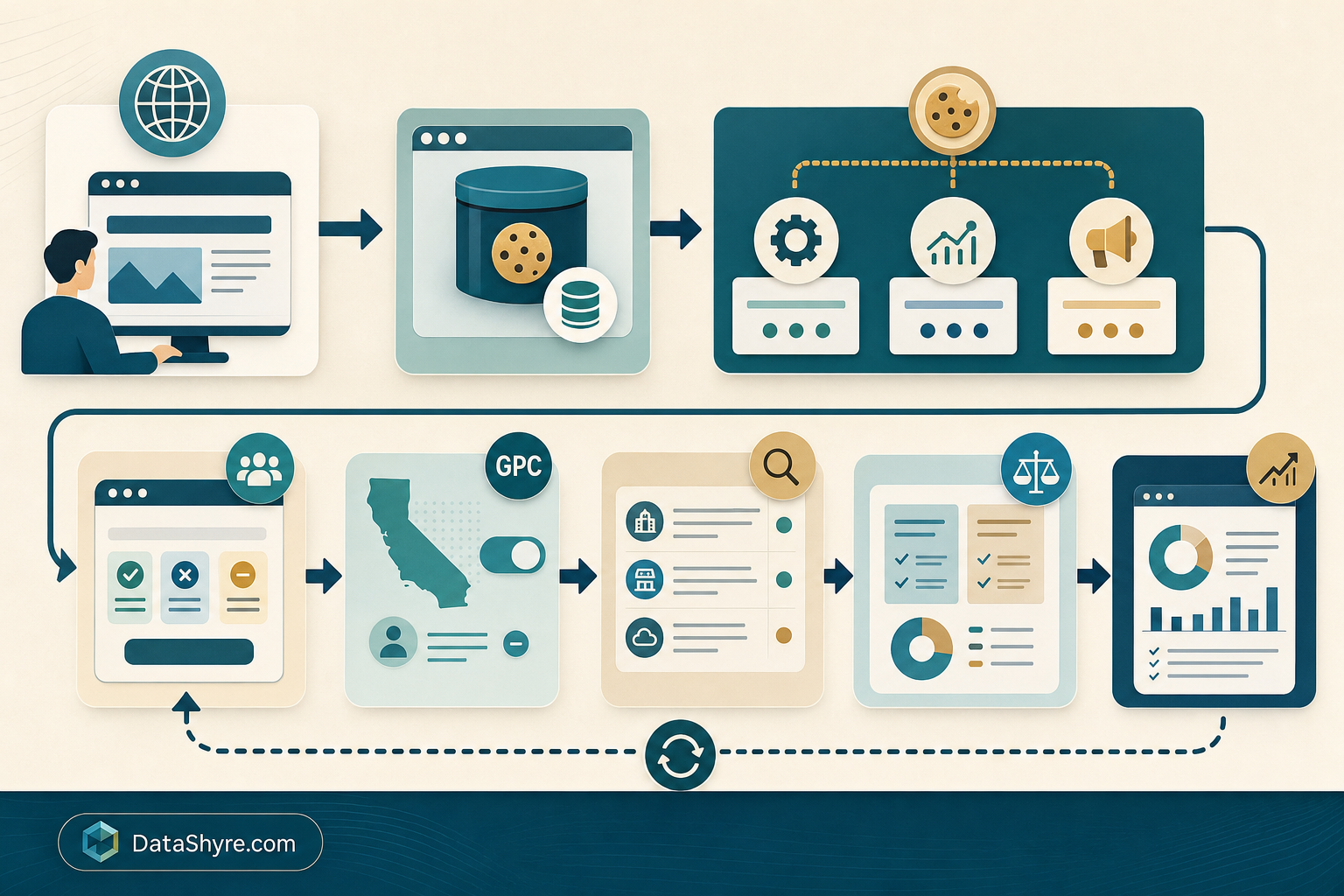
If I were auditing what are cookies on a website for a live site this week, I would use this order:
- list every cookie and adjacent storage or access technology that appears before any user choice;
- classify each one as necessary, preference, analytics, advertising, or embedded-third-party behavior;
- inspect session versus persistent lifetimes and compare them to the stated purpose;
- map which vendors or services receive the resulting data;
- test no-choice, reject, accept, and later withdrawal states;
- test California opt-out and GPC handling where sale or sharing may apply; and
- compare the live behavior against the privacy policy and consent copy.
That order usually answers the real version of what are cookies on a website faster than another abstract debate about cookie-banner wording.
FAQ
Are cookies on a website always used for tracking?
No. Many website cookies support basic functions people expect, such as keeping a person signed in, preserving a shopping cart, or remembering a language setting. The higher-risk branch is usually optional analytics, advertising, profiling, or cross-context recognition.
Can a website work without cookies?
Sometimes yes, sometimes no. Some websites can still function with reduced cookies, but specific features like login persistence, carts, security state, or saved preferences may break or become less convenient without them.
If I delete website cookies, does that stop all tracking?
No. Deleting cookies may remove stored browser identifiers, but it does not automatically stop pixels, fingerprinting, local storage, or other storage-and-access technologies.
Bottom line
So, what are cookies on a website?
They are small browser data records that a website uses to remember state across visits or requests. In 2026, though, the useful review is bigger than that definition.
You also need to know what each cookie does, whether it is necessary, how long it lasts, which vendor receives the data, what regional privacy rule applies, and what actually changes after a user rejects, opts out, or withdraws a choice.
The fastest way to judge what are cookies on a website is to test it the way a broken deployment would expose it: before consent, after consent, and again after a stack change.
Sources
- MDN, Cookie glossary: https://developer.mozilla.org/en-US/docs/Glossary/Cookie
- MDN, Cookie header: https://developer.mozilla.org/en-US/docs/Web/HTTP/Reference/Headers/Cookie
- MDN, Document.cookie: https://developer.mozilla.org/en-US/docs/Web/API/Document/cookie
- Chrome for Developers, View, add, edit, and delete cookies: https://developer.chrome.com/docs/devtools/application/cookies/
- Firefox Help, Total Cookie Protection and website breakage FAQ: https://support.mozilla.org/en-US/kb/total-cookie-protection-and-website-breakage-faq
- FTC Consumer Advice, How Websites and Apps Collect and Use Your Information: https://consumer.ftc.gov/articles/how-websites-and-apps-collect-and-use-your-information
- ICO, Guidance on the use of storage and access technologies: https://ico.org.uk/for-organisations/direct-marketing-and-privacy-and-electronic-communications/guidance-on-the-use-of-storage-and-access-technologies/
- ICO, Final storage and access technologies guidance published: https://ico.org.uk/about-the-ico/media-centre/news-and-blogs/2026/04/final-storage-and-access-technologies-guidance-published/
- European Commission, Legal grounds for processing data: https://commission.europa.eu/law/law-topic/data-protection/information-business-and-organisations/legal-grounds-processing-data_en
- California Department of Justice, Global Privacy Control (GPC): https://oag.ca.gov/privacy/ccpa/gpc
- CNIL, Cookies and mobile application: 7 million euros fine against FNAC DARTY PARTICIPATIONS ET SERVICES and FNAC DIRECT: https://www.cnil.fr/en/sanction-app-cookies-fnac