Cookies Computer in 2026: What People Mean, What Cookies Do, and 7 Privacy Checks
The real value in cookies computer shows up when you debug it like a live system. A banner can render perfectly and still leak requests, misfire tags, or drift after the next plugin or theme update.
The useful test for cookies computer is whether the live stack behaves correctly before consent, after consent, and after the next deployment. That is how hidden leaks and timing mistakes show up.
It might also be invasive.
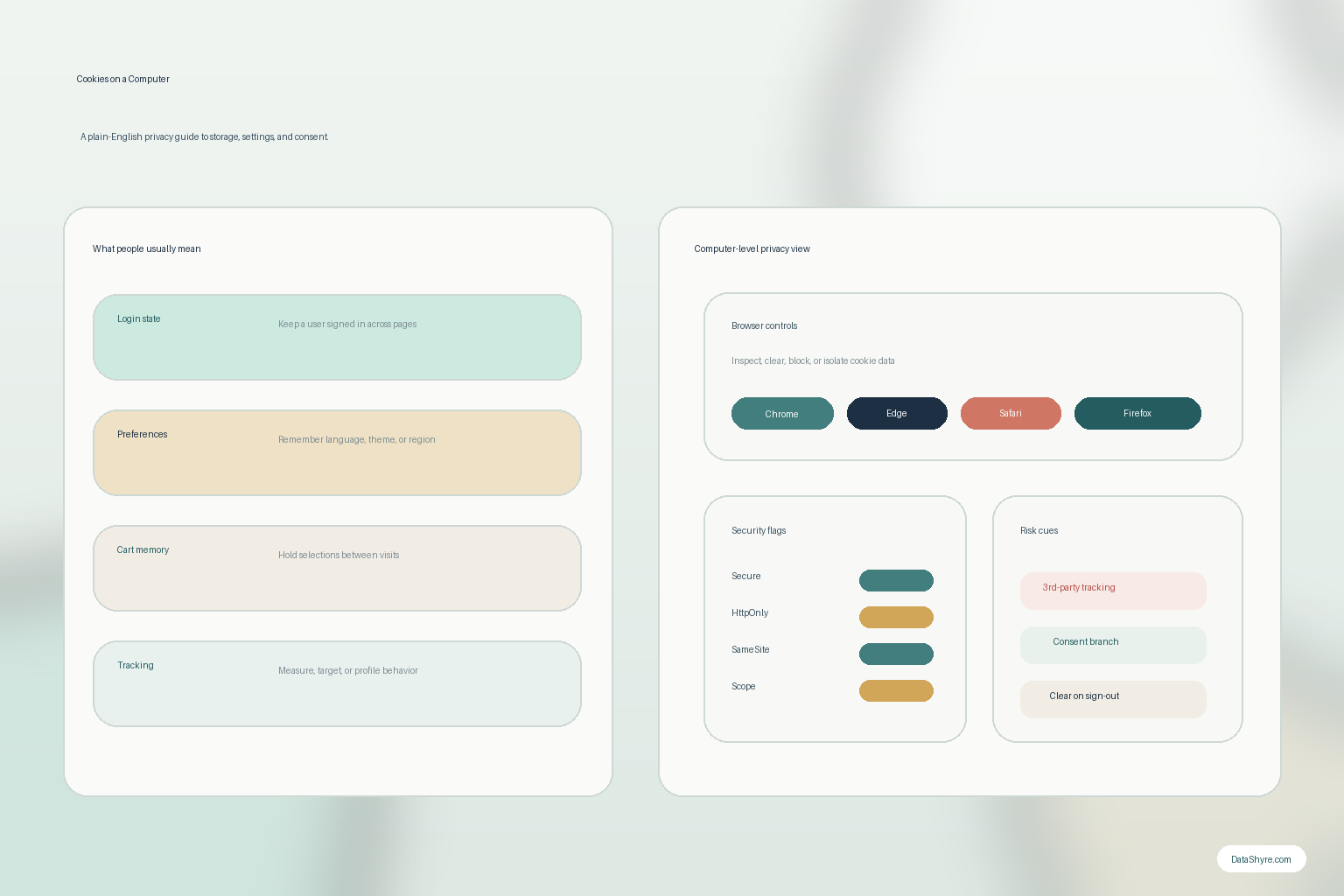
Cookies on a computer can keep you signed in, remember a shopping cart, save a language preference, or keep a site stable between clicks. They can also support analytics, advertising, cross-site recognition, and profiling when the implementation goes beyond what a person reasonably expects.
This is why the modern cookies computer review should not stop at how do I delete cookies.
It should also ask:
- what each cookie actually does;
- whether it is necessary or optional;
- how the browser handles it;
- what happens when the person rejects or clears it; and
- whether the site is using other tracking methods around it.
If you want adjacent explainers first, start with these guides to browser cookies, third party cookies, and internet cookies. This page stays more plain-English and computer-focused. It is the cookies computer guide I would hand to a non-specialist teammate this week.
If your team is trying to get cookies computer under control without adding a heavyweight privacy stack, DataShyre can help. DataShyre focuses on consent and preference management that are easier to implement, easier to operate, and easier to trust on a live site. Start with DataShyre’s consent and preference management or book a demo.
1. Start with what cookies on a computer actually are
At the technical level, cookies are still simple.
MDN’s current HTTP documentation says a server can send Set-Cookie headers in a response, and the browser can later send the stored values back in the Cookie request header. That is the basic mechanism behind the cookies computer idea.
So when people talk about cookies on a computer, they usually do not mean a mysterious file living on its own somewhere in the machine.
They mean browser-managed website data tied to a visit, a user state, or a later request.
That browser-level storage is why cookies can support:
- logged-in sessions;
- shopping-cart memory;
- language or display preferences;
- site analytics; and
- advertising or cross-context recognition.
The mechanism is neutral. The purpose determines the privacy risk.
2. Separate useful computer cookies from tracking cookies
One of the easiest cookies computer mistakes is assuming all cookies are either harmless or bad.
Neither shortcut is reliable.
Some cookies on a computer are necessary for a site to work properly. A session cookie that keeps a person signed in during checkout is not the same thing as a longer-lived identifier used to recognize them across visits or across different properties.
The ICO’s current guidance still treats purpose as the critical question. It says the rules now apply more broadly to “storage and access technologies” and explains that cookies can be used for things like remembering a shopping basket, supporting login, analysing traffic, or tracking browsing behavior.
So a practical cookies computer review should sort items into groups such as:
- necessary service cookies;
- preference cookies;
- analytics cookies;
- advertising cookies; and
- third-party or embedded-service cookies.
That classification is more useful than a single giant cookie export.
3. Remember that browsers do not all treat cookies the same way
Another reason the cookies computer question is bigger in 2026 is that browser behavior now differs in visible ways.
Mozilla’s current Firefox support materials say Total Cookie Protection keeps cookies in a separate jar for each website and blocks third-party cookies used for cross-site tracking in protected contexts. That means the same site can produce different results depending on which browser the person is using and what privacy settings are enabled.
That matters for both users and site teams.
For users, it explains why a site may work differently on one browser than another.
For site owners, it means a single-browser pass is not enough evidence for a cookies computer audit.
At minimum, test:
- one Chromium-based browser such as Chrome or Edge;
- Firefox with its current protections;
- no-choice behavior;
- reject behavior; and
- cleared-cookie or fresh-profile behavior.
4. Learn how to inspect and clear cookies on a computer without guessing
For a lot of searchers, cookies computer is really a practical question: where do I see them, and how do I remove them?
The official browser materials are fairly consistent on that point.
Chrome’s current help and DevTools documentation say users can delete browsing data that includes cookies, and developers can inspect cookie details directly in DevTools. Microsoft’s current Edge support says people can view all cookies and site data, clear them globally or for a specific site, or set cookies to be cleared when the browser closes. Apple’s current Safari support says Mac users can open Privacy settings, view website data, and remove some or all of it.
That means a sensible cookies computer cleanup process is usually:
- inspect the specific site first if you are troubleshooting one problem;
- clear only that site’s cookies when possible;
- use full-browser clearing when the issue is broader or the privacy goal is stronger; and
- expect that clearing cookies may sign you out or change site behavior.
Deleting everything is not wrong. It is just often more disruptive than necessary.
5. Review the security attributes on the site side too
The cookies computer topic sounds user-side, but weak site-side settings are often the bigger risk.
MDN’s current secure-cookie guidance still recommends setting Secure on cookies that should only travel over HTTPS, using HttpOnly when JavaScript access is not needed, and using SameSite deliberately rather than leaving cross-site behavior vague.
So if a cookie on a computer supports an authenticated session, account state, or other sensitive workflow, a useful review should check:
- whether
Secureis present; - whether
HttpOnlyis present where appropriate; - whether
SameSitematches the intended use; - whether the domain and path scope are broader than necessary; and
- whether the duration is longer than the real business need.
This is the branch where security and privacy meet.
6. Do not stop at classic cookies
This is where many outdated cookies computer articles miss the real 2026 picture.
The ICO’s finalized guidance published on April 29, 2026 says the rules apply to technologies that store information or access information stored on a user’s device, including cookies, tracking pixels, link decoration, web storage, fingerprinting techniques, and scripts or tags.
In other words, fewer visible cookies on a computer does not automatically mean less tracking.
A site can shift behavior into local storage, pixels, tags, or another identifier path and end up with a very similar privacy result.
This is why a serious cookies computer review should also ask:
- what fires before user choice;
- whether local or session storage is doing similar work;
- what third-party scripts or embeds are present; and
- whether the site has simply replaced one tracking method with another.
7. Tie cookies on a computer to consent and opt-out rights
The biggest privacy mistake is treating cookies computer as only a technical housekeeping issue.
It is also a consent and rights issue.
In the UK and EU branch, the ICO’s current compliance guidance says non-exempt storage and access technologies generally need consent before use. That still matters for many analytics, advertising, and profiling cookies on a computer.
In California, the review can look different. The California Department of Justice still says the Global Privacy Control is a “stop selling or sharing my data switch” available in some browsers and extensions, and covered businesses must honor it as a valid request where the law applies.
So if the cookies computer flow contributes to sale, sharing, cross-context behavioral advertising, or similar downstream use, the right question is not only can a person clear the cookie.
It is also:
- does the notice explain what is happening;
- does the opt-out path work;
- does GPC change behavior where applicable; and
- does the live result match the promise.
A practical 7-step cookies computer review
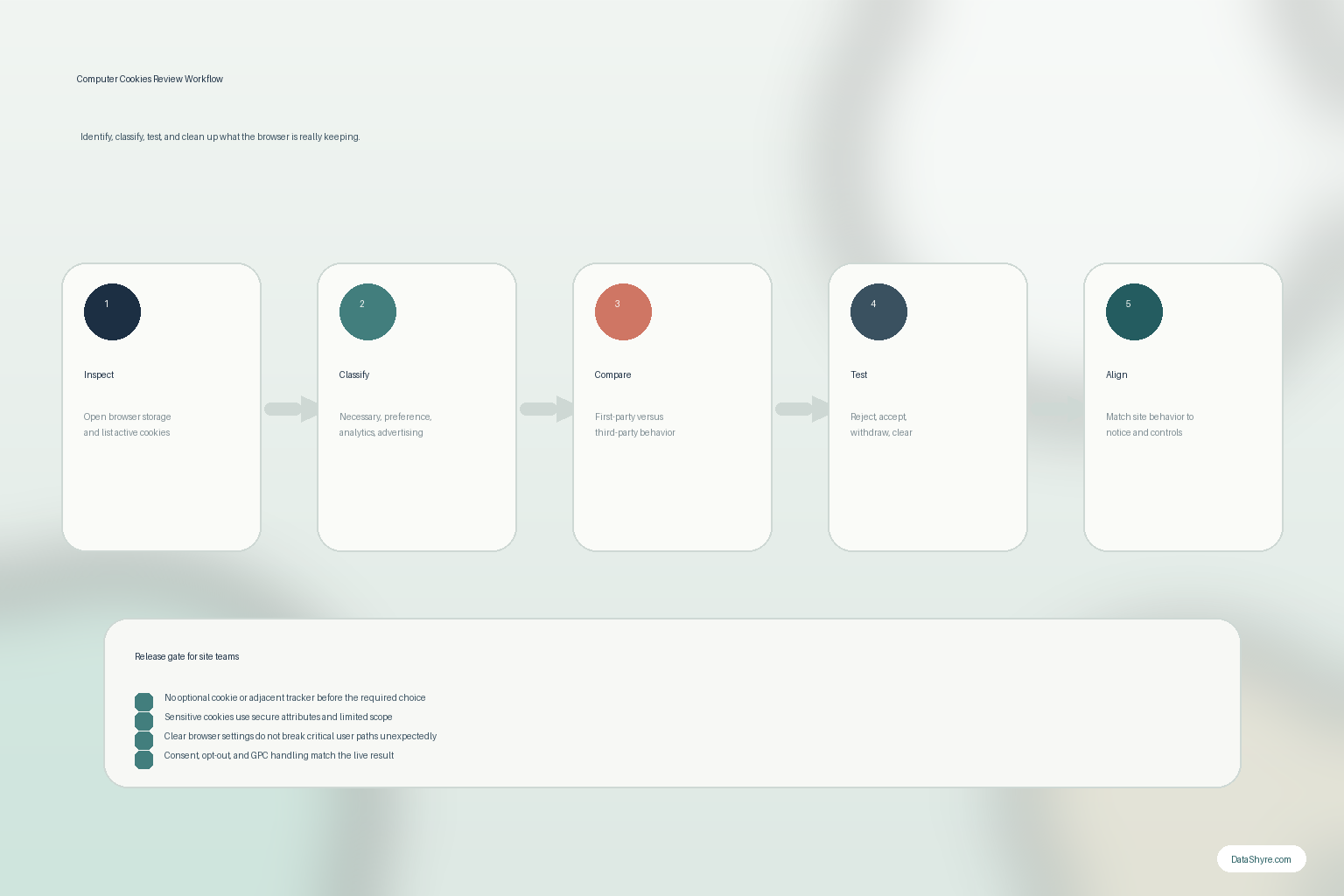
If you were reviewing cookies computer behavior this week, use this order:
- inspect the browser’s stored cookies and site data for the relevant page or service;
- label each item as necessary, preference, analytics, advertising, or third-party behavior;
- compare one Chromium browser with Firefox instead of assuming storage works the same everywhere;
- review the lifetime and security attributes on cookies that affect session or account state;
- test reject, accept, later withdrawal, and cleared-cookie behavior;
- check for local storage, pixels, scripts, or other technologies doing similar tracking work; and
- compare the live findings against the notice, consent, and opt-out experience.
That workflow tells you much more than either a browser clean-up tip or a policy document alone.
FAQ
Are cookies on a computer always bad?
No. Many cookies on a computer support ordinary site functions such as login state, cart memory, or preferences. The higher-risk branch is usually optional analytics, advertising, or cross-site recognition.
Will deleting cookies on a computer improve privacy?
Often yes, at least temporarily, because it can remove stored identifiers and sign you out of websites. But it does not guarantee tracking stops if the site also uses other storage or access technologies.
Can blocking all cookies break websites?
Yes. The browser vendors themselves note that stricter cookie blocking can prevent some pages from working correctly. That is one reason site-specific review is often better than blindly blocking everything.
Bottom line
The safest way to think about cookies computer in 2026 is not random clutter I should occasionally wipe.
It is browser-managed state that can support convenience, security, measurement, or tracking depending on how it is used.
If you know what each cookie does, how browsers treat it, when it is cleared, which rights apply, and whether another technology is doing the same job in the background, you are asking the right question.
The fastest way to judge cookies computer is to test it the way a broken deployment would expose it: before consent, after consent, and again after a stack change.
Sources
- MDN, Using HTTP cookies: https://developer.mozilla.org/en-US/docs/Web/HTTP/Guides/Cookies
- MDN, Cookie header: https://developer.mozilla.org/en-US/docs/Web/HTTP/Reference/Headers/Cookie
- MDN, Secure cookie configuration: https://developer.mozilla.org/en-US/docs/Web/Security/Practical_implementation_guides/Cookies
- Chrome for Developers, View, add, edit, and delete cookies: https://developer.chrome.com/docs/devtools/application/cookies
- Google Chrome Help, Delete browsing data in Chrome: https://support.google.com/chrome/answer/2392709
- Microsoft Support, Manage cookies in Microsoft Edge: https://support.microsoft.com/en-us/edge/manage-cookies-in-microsoft-edge-view-allow-block-delete-and-use
- Apple Support, Clear your cache and cookies in Safari on Mac: https://support.apple.com/en-gb/guide/safari/sfri11471/mac
- Mozilla Support, Total Cookie Protection and website breakage FAQ: https://support.mozilla.org/en-US/kb/total-cookie-protection-and-website-breakage-faq
- Mozilla Support, Third-party cookies and Firefox tracking protection: https://support.mozilla.org/en-US/kb/third-party-cookies-firefox-tracking-protection
- ICO, What are storage and access technologies?: https://ico.org.uk/for-organisations/direct-marketing-and-privacy-and-electronic-communications/guidance-on-the-use-of-storage-and-access-technologies/what-are-storage-and-access-technologies/
- ICO, How do we comply with the PECR rules?: https://ico.org.uk/for-organisations/direct-marketing-and-privacy-and-electronic-communications/guidance-on-the-use-of-storage-and-access-technologies/how-do-we-comply-with-the-pecr-rules
- California Department of Justice, Global Privacy Control (GPC): https://oag.ca.gov/privacy/ccpa/gpc