Cookies Browser in 2026: How to Inspect, Limit, and Test What Your Browser Stores
The real value in cookies browser shows up when you debug it like a live system. A banner can render perfectly and still leak requests, misfire tags, or drift after the next plugin or theme update.
The useful test for cookies browser is whether the live stack behaves correctly before consent, after consent, and after the next deployment. That is how hidden leaks and timing mistakes show up.
That is the more useful frame.
Cookies are still one of the main ways websites preserve state in an otherwise stateless web. But in 2026, a serious cookies browser review also has to look at neighboring storage, cross-browser differences, consent timing, opt-out signals, and whether the privacy copy matches what the browser is really doing.
If you want adjacent explainers first, start with browser cookies, website cookies, and tracking cookies. This page stays more operational. It is the cookies browser review I would use this week before telling a team the live setup is ready.
If your team is trying to get cookies browser under control without adding a heavyweight privacy stack, DataShyre can help. DataShyre focuses on consent and preference management that are easier to implement, easier to operate, and easier to trust on a live site. Start with DataShyre’s consent and preference management or book a demo.
If your team needs help turning those checks into a repeatable release process, DataShyre can help with consent management, data mapping, and DSR automation. The hard part is rarely finding a cookie table. It is proving that the browser behavior, policy language, vendor flows, and rights handling still line up after the next deployment.
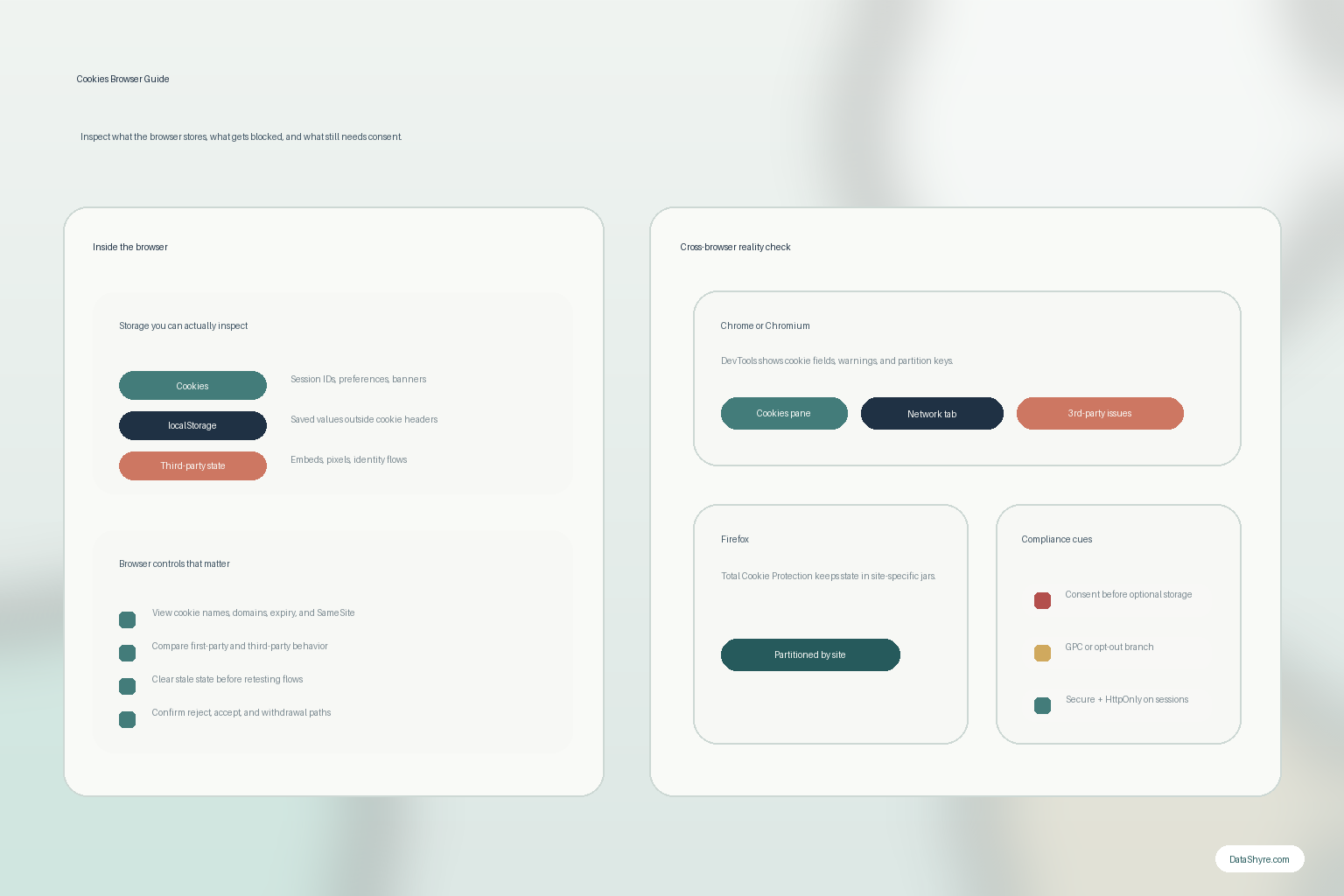
1. Start the cookies browser review inside the browser, not in a spreadsheet
The easiest cookies browser mistake is to begin with exported documentation instead of runtime evidence.
That is backwards.
MDN’s current HTTP cookie documentation still describes the basic mechanism clearly: servers send cookies in Set-Cookie headers, and browsers send stored values back later in the Cookie request header when the rules for that cookie allow it. That means the browser is one of the cleanest places to inspect what the site is really relying on.
For a practical cookies browser review, I would start by loading the live page in a clean state and checking:
- which cookies appear before any user choice;
- which cookies only appear after authentication;
- which cookies only appear after accepting optional features;
- which domains are setting them; and
- which values persist after reload, sign-out, or revisit.
This matters because a privacy policy, CMP scan, or vendor checklist can lag behind production. The browser state usually tells the truth faster.
2. Do not confuse cookies with the whole browser-storage story
Another common cookies browser problem is thinking the cookie list is the entire audit.
It is not.
The ICO finalized major storage-and-access-technologies guidance on April 29, 2026 and made the scope explicit: the rules are not limited to classic cookies. The guidance covers technologies that store information, or access information stored, on a user’s device, including cookies, scripts, tags, and other storage paths.
That changes the review.
If a site reduces obvious cookies but still uses local storage, embedded third-party tools, tags, or other device-level access for the same analytics or advertising outcome, the privacy risk did not magically disappear.
So during a cookies browser review, I would check at least:
- the cookie table itself;
- local storage or session storage values;
- embedded widgets or media that create third-party state;
- requests that fire before consent or opt-out handling completes; and
- whether the same business purpose is being recreated outside the visible cookie list.
That broader lens is often the difference between a checkbox audit and a real one.
3. Separate session cookies from persistent identifiers and check the security flags
A useful cookies browser review should also answer a narrower technical question: what kind of state is this, and how risky is it?
MDN still distinguishes between session cookies and persistent cookies. Session cookies usually end with the browser session, while persistent cookies use Expires or Max-Age so they last longer.
That difference matters.
A session cookie that keeps a logged-in user authenticated is not the same risk profile as a persistent identifier used for analytics, ad measurement, or recognition across visits.
This is also where cookie attributes matter. MDN’s current secure-cookie guidance still recommends using Secure for HTTPS-only transmission and HttpOnly where JavaScript access is not needed. Chrome DevTools keeps those fields visible because they still matter operationally when you inspect a live site.
So for cookies browser work, I would always ask:
- is this cookie necessary for a live user path or mostly optional;
- how long does it persist;
- is
Securepresent where it should be; - is
HttpOnlypresent for session-related cookies; - is
SameSitedeliberate rather than accidental; - is the domain or path scope broader than necessary.
Weak cookie hygiene and weak consent hygiene often show up together on the same site.
4. Compare Chrome and Firefox before making claims about behavior
Old cookies browser articles often assume all browsers behave the same way.
They do not.
Chrome’s current DevTools cookie guidance still exposes fields like domain, path, expiry, HttpOnly, Secure, SameSite, and a partition key for cookies with independent partition state. That makes Chrome useful for inspecting what a site is trying to do and how the browser records it.
Firefox is useful for a different reason. Mozilla’s current support documentation says Total Cookie Protection partitions cookies into a separate jar for each site and is enabled by default within Firefox’s Enhanced Tracking Protection. That means embedded or third-party behavior can look different there, especially when a workflow depends on cross-site state.
The practical lesson for a cookies browser review is simple:
- a result in one browser is not enough evidence for all browsers;
- privacy features can isolate or block state differently;
- authentication, embeds, and measurement flows may break in one environment and not another;
- rollout claims should come after multi-browser checks, not before them.
This is why I would test Chrome or another Chromium browser for inspection detail, and Firefox for partitioning and privacy-protection behavior, before signing off.
5. Treat optional cookies and consent timing as a live runtime branch
This is the part where cookies browser stops being only a browser-settings topic and becomes a compliance topic.
The ICO’s current guidance is unusually plain here. It says organisations “must not pre-enable non-exempt storage and access technologies.” For many UK or EU-facing experiences, that means optional analytics, advertising, personalization, or similar storage cannot be allowed to run before the required consent branch is completed, unless an exception genuinely applies.
So a real cookies browser review should not stop at does the banner exist.
It should test:
- first load before any choice;
- explicit reject;
- explicit accept;
- later withdrawal or preferences change;
- whether any optional storage or similar technology appeared too early anyway.
If the site claims reject means no optional tracking, the browser should make that claim testable.
That is the standard I would use.
6. Keep California’s opt-out and GPC branch separate from the EU/UK consent branch
One of the fastest ways to confuse a cookies browser review is to treat every privacy regime like a cookie-banner problem.
California often changes the question.
The California Department of Justice says the Global Privacy Control is a “stop selling or sharing my data switch” available in some browsers or as an extension, and covered businesses must honor it as a valid consumer request where the law applies.
That means the California review is often less about whether a banner text looks polished and more about whether:
- the browser-level signal is detected;
- the sale-or-sharing branch actually changes behavior;
- the notice and privacy policy explain the user path accurately;
- downstream vendors stop receiving data in the scenarios where they should.
So in cookies browser work, I would keep the branches straight:
- UK or EU analysis often focuses on prior consent for non-exempt storage or access;
- California analysis often focuses on honoring opt-out choices, including GPC, where sale or sharing is implicated.
Those are related privacy controls, but they are not the same test.
7. Use clear-and-retest steps as a release gate, not a support chore
The most practical cookies browser habit is also the one teams skip most often: clear state and run the path again.
Browsers remember things. That is their job.
But remembered state also hides bugs:
- an earlier acceptance may make a broken reject path look fine;
- an old session may hide consent timing issues;
- a stale cookie or stored value may keep a broken embedded workflow limping along;
- cached assumptions may survive longer than the implementation that created them.
This is why Chrome DevTools and browser privacy settings are useful not just for inspection but for controlled retesting.
For a real cookies browser release check, clear the relevant state, rerun first load, and confirm whether the result still matches the notice, consent UI, privacy policy, and rights path.
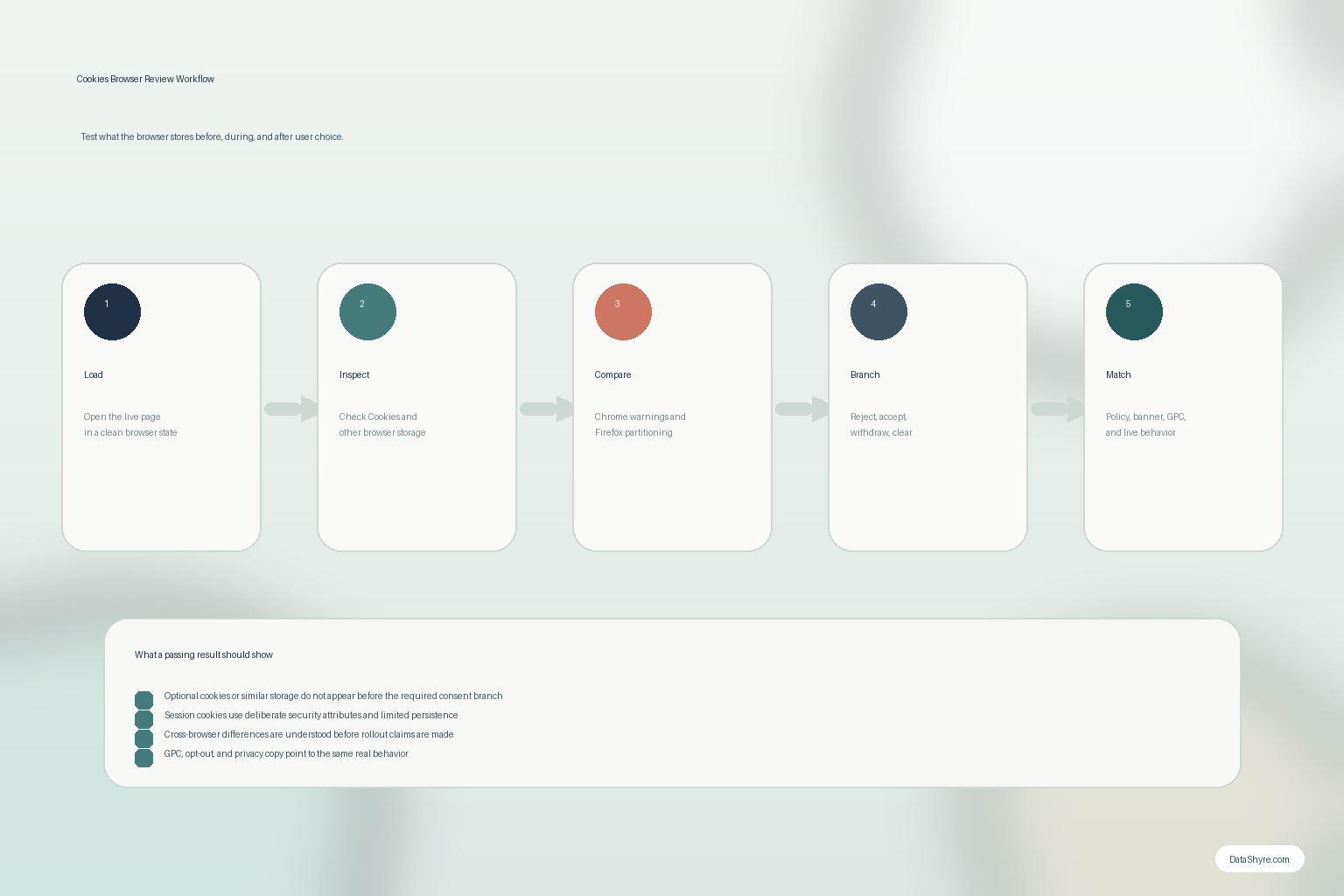
A practical 7-step cookies browser review
If I were auditing cookies browser behavior this week, I would use this order:
- load the live page in a clean browser state;
- inspect cookies plus adjacent browser storage before any user choice;
- classify each item as necessary, preference, analytics, advertising, embedded-third-party, or unknown;
- compare Chrome inspection detail with Firefox privacy-protection behavior;
- test reject, accept, later withdrawal, and sign-out branches;
- test California opt-out or GPC behavior where sale or sharing may be in scope;
- compare the live findings against the privacy policy, notice text, and vendor claims.
That sequence usually surfaces the truth much faster than reviewing copied privacy language alone.
FAQ
Does cookies browser mean the same thing as browser cookies?
Usually yes. People searching cookies browser are normally trying to understand or inspect cookies stored by the browser, even if the query itself is awkwardly phrased.
Can I inspect cookies without changing the site?
Yes. Modern browsers let you inspect cookie names, domains, expiry, and key attributes from built-in tools. Chrome DevTools is especially useful for this, and Firefox is useful when you want to see how stronger privacy protections affect behavior.
If the cookie list looks short, does that mean the privacy risk is low?
No. A short cookie list does not prove the site is doing little. You still need to check adjacent browser storage, embedded third-party behavior, requests, and whether optional purposes are firing before the right user choice.
Bottom line
The best way to think about cookies browser in 2026 is not where do I click to see the cookie list.
It is how do I verify what the browser stores, what protections the browser applies, and whether the site's privacy promises survive a live test.
If you can answer those questions across clean-state loads, cross-browser checks, consent timing, and opt-out behavior, you are much closer to the truth.
The fastest way to judge cookies browser is to test it the way a broken deployment would expose it: before consent, after consent, and again after a stack change.
Sources
- MDN, Using HTTP cookies: https://developer.mozilla.org/en-US/docs/Web/HTTP/Guides/Cookies
- MDN, Set-Cookie header: https://developer.mozilla.org/en-US/docs/Web/HTTP/Reference/Headers/Set-Cookie
- MDN, Secure cookie configuration: https://developer.mozilla.org/en-US/docs/Web/Security/Practical_implementation_guides/Cookies
- Chrome for Developers, View, add, edit, and delete cookies: https://developer.chrome.com/docs/devtools/application/cookies/
- Mozilla Support, Total Cookie Protection and website breakage FAQ: https://support.mozilla.org/en-US/kb/total-cookie-protection-and-website-breakage-faq
- ICO, Guidance on the use of storage and access technologies: https://ico.org.uk/for-organisations/direct-marketing-and-privacy-and-electronic-communications/guidance-on-the-use-of-storage-and-access-technologies/
- ICO, How do we comply with the PECR rules?: https://ico.org.uk/for-organisations/direct-marketing-and-privacy-and-electronic-communications/guidance-on-the-use-of-storage-and-access-technologies/how-do-we-comply-with-the-pecr-rules
- California Department of Justice, Global Privacy Control (GPC): https://oag.ca.gov/privacy/ccpa/gpc