Cookie Notification in 2026: When a Notice Is Not Enough and 7 Live Checks to Run
The real value in cookie notification shows up when you debug it like a live system. A banner can render perfectly and still leak requests, misfire tags, or drift after the next plugin or theme update.
The useful test for cookie notification is whether the live stack behaves correctly before consent, after consent, and after the next deployment. That is how hidden leaks and timing mistakes show up.
If the site says a person can reject optional tracking, the site needs to behave that way in the browser too.
That is where the current official sources still point. The ICO’s final storage-and-access guidance, published on April 29, 2026, says the rules cover cookies, tracking pixels, device fingerprinting, and similar technologies. The European Commission still says consent requests should use “clear and plain language” and withdrawal should be possible through a method “as easy to use as giving consent.” The CNIL still says “rejecting cookies should be just as easy as accepting them.” California’s Department of Justice still describes Global Privacy Control as a “stop selling or sharing my data switch.” And the CPPA’s enforcement advisory on dark patterns still tells businesses to offer “symmetry in choice” when they present privacy decisions.
That means a strong cookie notification in late 2026 is not only banner copy.
It is a live check on whether:
- optional technologies wait for the right state;
- refusal is as usable as acceptance;
- withdrawal still works later;
- California opt-out signals are respected where they should be; and
- the visible promise matches the runtime.
If you want nearby companion reads first, start with these guides to cookie notice, cookie banner examples, and cookie preferences. This page stays narrower. It is the cookie notification review I would use this week before trusting what a site banner claims.
If your team is trying to get cookie notification under control without adding a heavyweight privacy stack, DataShyre can help. DataShyre focuses on consent and preference management that are easier to implement, easier to operate, and easier to trust on a live site. Start with DataShyre’s consent and preference management or book a demo.
If your team needs help making the notification behave like the policy promise, DataShyre can help with consent implementation, tag QA, browser testing, and privacy-notice alignment so the live site does not drift away from the banner.

1. Start with the no-choice state, not the accepted state
Most cookie notification reviews start in the wrong place.
Teams click Accept all, see a polished state, and assume the banner is fine.
The better first test is the clean-load state before the visitor clicks anything.
That matters because the ICO’s current guidance is not limited to old cookie tables. It now speaks more broadly about storage and access technologies, including scripts, tags, pixels, and similar techniques. If optional technologies are already reading or storing information before the user makes a real choice, the notification is weaker than it looks.
So for a serious cookie notification review, test:
- first page load in a fresh browser;
- another page view without interacting;
- mobile and desktop separately; and
- pages with embeds, chat, booking, or analytics-heavy layouts.
If optional measurement or marketing behavior starts too early, the notification is already failing its first promise.
2. Make refusal as real as acceptance
This is still one of the clearest checks.
The European Commission says withdrawal should be possible through a method “as easy to use as giving consent.” The CNIL says “rejecting cookies should be just as easy as accepting them.” California’s CPPA uses similar logic through its advisory on “symmetry in choice.”
So a strong cookie notification should make it practical to:
- accept all quickly;
- reject optional tracking just as quickly when that path is required;
- understand what each choice means; and
- do the same thing on mobile without hunting for faint links.
If Accept all is a big button and refusal is a low-contrast text link buried in a paragraph, the notification is not a neutral control.
3. Keep the copy specific enough to describe the real technologies
A lot of cookie notification text still hides behind phrases like improve your experience.
That usually means the copy is trying to sound friendly instead of useful.
The safer standard is to explain whether the site is asking about analytics, advertising, personalization, embedded media, chat tools, or another real purpose. The European Commission’s guidance on consent still points toward specific, informed consent, not vague atmosphere.
So the practical review is not only does the notification exist.
It is whether the notification helps a visitor understand:
- what the optional technologies are for;
- which categories matter;
- whether settings can be changed later; and
- where fuller privacy or cookie information lives.
If the copy sounds polished but hides the real purposes, the cookie notification is doing branding work, not disclosure work.
4. Test withdrawal after the first visit, not only the first interaction
This is where many otherwise decent setups break down.
The banner works on day one, but the later control path is messy, hidden, or disconnected from the actual tags.
That matters because consent is not only a first-click event. The European Commission’s current explanation still says people should be able to withdraw through a method “as easy to use as giving consent.”
So a real cookie notification review should confirm:
- there is a visible return path to preferences;
- the path works on the same device classes where consent was collected;
- optional tags or storage change after withdrawal; and
- the page, policy, and settings panel all describe that path consistently.
If the site says change your preferences anytime but nobody can find the route later, the notification is overstating the control users actually have.
5. Separate EU or UK consent logic from California opt-out logic
This is one of the most useful checks in 2026.
In EU- or UK-facing contexts, the practical question often centers on prior choice for non-essential storage or access technologies. In California, another live question is whether the site properly handles opt-out of sale or sharing where that right applies.
California’s Department of Justice still describes Global Privacy Control as a “stop selling or sharing my data switch.” The CPPA’s public materials also continue to say businesses must honor valid opt-out preference signals such as GPC.
That means a serious cookie notification review should ask:
- is the banner handling consent where consent is the right model;
- is the California branch more than a cosmetic wording change;
- does the site detect and process GPC when required;
- do downstream advertising or sharing-related tools actually change state; and
- does the privacy notice describe that behavior honestly.
A notification can look complete and still leave the California path underdesigned.
6. Compare the notification against the runtime, not just the settings record
This is where live browser testing matters more than screenshots.
The banner may store a preference correctly while the site still loads an embed, pixel, or tag too early. Or the banner may say reject while one vendor keeps firing in the background.
This is why a useful cookie notification check compares at least:
- the visible banner language;
- the settings panel categories;
- the cookies or other device-level storage written;
- the outbound network requests; and
- the related privacy or cookie page.
If those layers tell different stories, the user is not being given one coherent privacy control.
They are being given several conflicting ones.
7. Treat cookie notifications as release-sensitive controls, not one-time projects
The quiet failure mode is drift.
A new plugin, pixel, video embed, tag-manager publish, or chat widget can make the cookie notification inaccurate without anyone rewriting the banner text.
This is why the better operating model is to re-check the notification when:
- new marketing or analytics tools are added;
- a theme or plugin changes how scripts load;
- the banner or consent platform is reconfigured;
- an app or logged-in area gets new tracking features; or
- the privacy notice or cookie page is revised.
If nobody owns those checks, the notification becomes a static promise attached to a moving system.
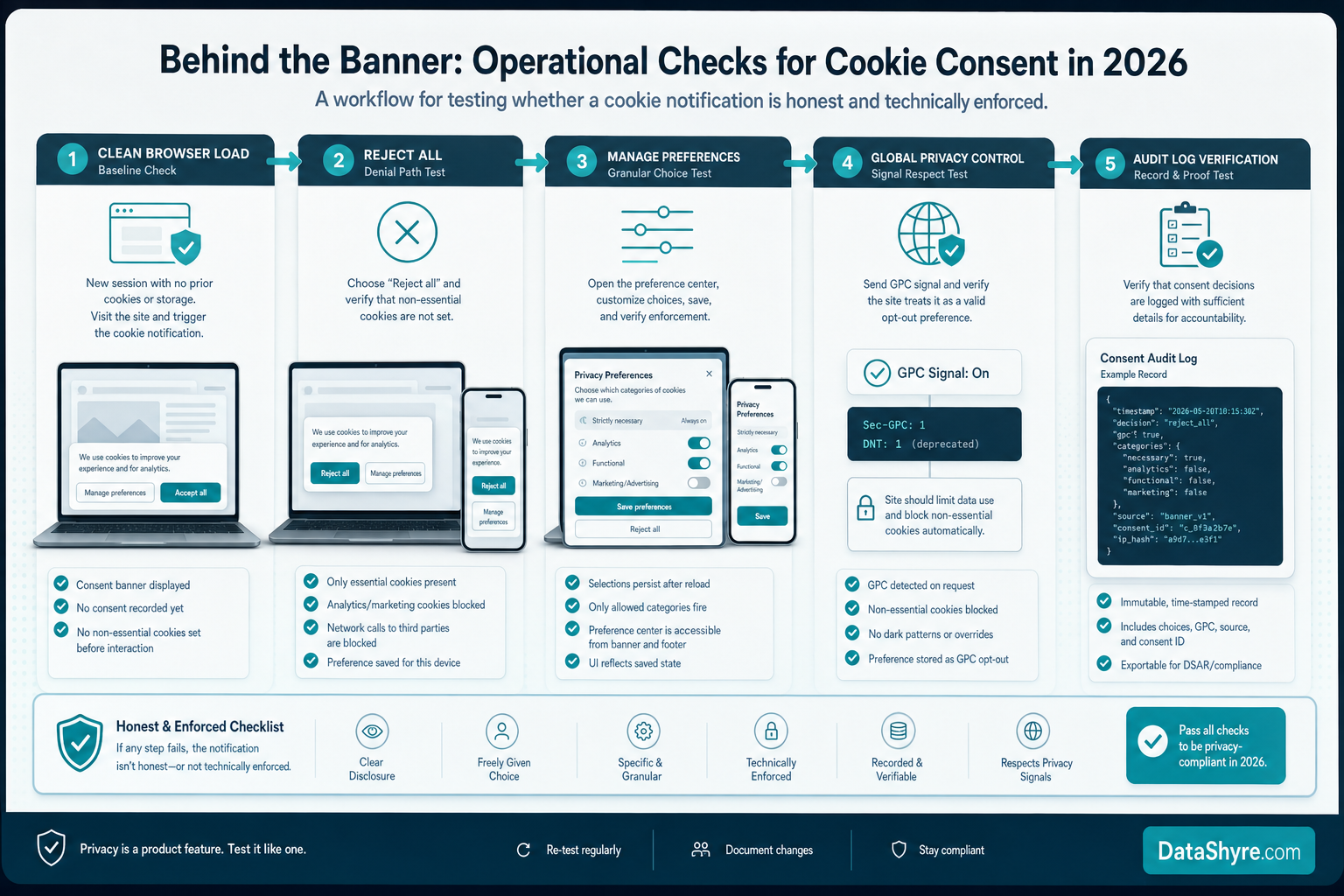
A practical cookie notification review for this week
If you were reviewing a cookie notification today, use this order:
- test the clean-load state before any user choice;
- compare accept and reject paths on desktop and mobile;
- verify the copy names real purposes clearly enough;
- confirm the withdrawal path after first visit;
- separate EU or UK consent logic from California opt-out logic;
- compare banner text against actual browser behavior; and
- define which releases automatically trigger a re-review.
That sequence usually finds more truth than another pass through banner wording alone.
FAQ
Is a cookie notification the same thing as a consent banner?
Often the terms overlap in practice, but a cookie notification can be broader. Some teams use it for a simple notice, while others mean a banner plus settings controls. The important question is whether it gives real choice and changes live behavior.
Is a cookie notification enough by itself?
Usually no. A notification can explain the choice, but the site still needs underlying controls, policy alignment, and browser-level behavior that matches what the notification says.
Does California treat cookie notifications the same way as EU consent banners?
Not exactly. California rights analysis often turns on sale-or-sharing opt-out paths and signals such as GPC, while EU or UK analysis often focuses more directly on prior choice for non-essential storage or access technologies. Some sites need both branches to work.
Bottom line
The best cookie notification in 2026 is not the prettiest banner.
It is the one that:
- waits before optional technologies run;
- makes refusal and withdrawal genuinely usable;
- handles California opt-out signals where needed;
- keeps the banner, policy, and runtime aligned; and
- still works after the next release.
If those checks pass, the notification is acting like a real privacy control.
The fastest way to judge cookie notification is to test it the way a broken deployment would expose it: before consent, after consent, and again after a stack change.
Official sources used
- ICO, final storage and access technologies guidance announcement: https://ico.org.uk/about-the-ico/media-centre/news-and-blogs/2026/04/final-storage-and-access-technologies-guidance-published/
- ICO, guidance on the use of storage and access technologies: https://ico.org.uk/for-organisations/direct-marketing-and-privacy-and-electronic-communications/guidance-on-the-use-of-storage-and-access-technologies/
- European Commission, legal grounds for processing data: https://commission.europa.eu/law/law-topic/data-protection/information-business-and-organisations/legal-grounds-processing-data_en
- CNIL, dark patterns in cookie banners: https://www.cnil.fr/en/dark-patterns-cookie-banners-cnil-issues-formal-notice-website-publishers
- California Department of Justice, CCPA page: https://oag.ca.gov/privacy/ccpa
- California Privacy Protection Agency, enforcement advisory on dark patterns: https://cppa.ca.gov/pdf/enfadvisory202402.pdf
- California Privacy Protection Agency, FAQs: https://cppa.ca.gov/faq.html