Browser Cookies in 2026: What They Do, How Browsers Treat Them, and 7 Live Checks
The real value in browser cookies shows up when you debug it like a live system. A banner can render perfectly and still leak requests, misfire tags, or drift after the next plugin or theme update.
The useful test for browser cookies is whether the live stack behaves correctly before consent, after consent, and after the next deployment. That is how hidden leaks and timing mistakes show up.
The practical review is not narrow anymore.
In 2026, a useful browser cookies review has to cover at least four things at once:
- what the cookie actually does;
- how the browser stores, limits, or sends it back;
- whether it supports the service or supports tracking; and
- whether the site’s live behavior still matches the consent or opt-out path shown to the user.
If you want the adjacent explainers first, start with what are cookies on the internet, cookie consent, and website privacy checker. This page stays more browser-specific. It is the browser cookies review I would use this week before telling a team the live setup is fine.
If your team is trying to get browser cookies under control without adding a heavyweight privacy stack, DataShyre can help. DataShyre focuses on consent and preference management that are easier to implement, easier to operate, and easier to trust on a live site. Start with DataShyre’s consent and preference management or book a demo.
1. Start with what a browser cookie actually is
At the protocol level, browser cookies are still simple.
MDN’s current HTTP documentation says a server can send one or more Set-Cookie headers in a response, and the browser usually sends previously stored cookies back later in the Cookie request header.
That mechanism is why browser cookies became so common. They can help a site:
- keep a person signed in;
- remember a language or display preference;
- preserve a shopping cart between pages;
- remember whether a notice was already dismissed; and
- support analytics or advertising workflows.
The key point is that the mechanism is neutral.
Some browser cookies support basic service delivery. Some support convenience. Some support tracking, profiling, or attribution. If you skip that purpose question, you miss most of the real review.
2. Separate session memory from longer-lived browser memory
One of the easiest ways to misunderstand browser cookies is to assume they all behave the same way over time.
They do not.
MDN’s current cookie guidance distinguishes between:
- session cookies, which typically do not include
Max-AgeorExpiresand are deleted when the current session ends; and - persistent cookies, which use an expiry date or maximum age and can remain longer.
That matters because persistence changes the risk profile.
A short-lived session cookie that keeps an authenticated user logged in is a very different thing from a longer-lived identifier used for measurement or cross-context recognition.
The ICO’s current guidance also says duration should be proportionate and limited to what is necessary for the purpose, and notes that browser-imposed expiry limits can affect persistent cookies.
So for browser cookies, always ask:
- is this cookie only needed during the session;
- if it persists, how long does it last;
- why does it need to last that long; and
- does that duration still make sense for the purpose claimed?
3. Do not assume every browser treats cookies the same way
This is where old articles about browser cookies usually go stale.
Browsers do not handle all cookies the same way, especially for cross-site use.
Mozilla’s current Firefox support materials say Firefox can block third-party cookies in Enhanced Tracking Protection Strict mode and also uses Total Cookie Protection, which keeps cookies in the site where they were created so they cannot be shared across websites in the same way.
Chrome’s current developer tools documentation shows a different operational view. Chrome still exposes cookie details such as HttpOnly, Secure, SameSite, expiry, and a partition key for cookies with independent partition state.
The practical lesson for browser cookies is simple:
- browser behavior varies;
- privacy mode and settings matter;
- some cross-site behavior is reduced or isolated in one browser but not identical in another; and
- your live site may behave differently across traffic segments.
This is why I would not treat one browser test as proof for all browser cookies behavior.
4. Remember that browser cookies are only one part of the storage story
A lot of teams still treat browser cookies as the whole online-tracking conversation.
That is no longer the safe model.
The ICO’s final 2026 storage-and-access-technologies guidance says PECR applies to technologies that store information, or access information stored, on a user’s device, and expressly lists cookies, tracking pixels, link decoration, web storage, fingerprinting techniques, and scripts or tags.
That matters because a site can show fewer obvious browser cookies while still keeping the same measurement or profiling outcome through local storage, scripts, pixels, or a different identifier path.
So when a site owner asks whether browser cookies are under control, I would not stop at the cookies table.
I would also check:
- requests fired before user choice;
- embedded third-party widgets and media;
- local storage or session storage;
- tag-manager logic; and
- whether another technology is recreating the same tracking purpose.
5. Review the security attributes, not only the privacy copy
Some browser cookies problems are not really banner problems.
They are cookie-configuration problems.
MDN’s current secure-cookie guidance still recommends:
- setting
Secureso cookies are only sent over HTTPS; - setting
HttpOnlyfor cookies that do not need JavaScript access; and - using prefixes such as
Host-orSecure-where appropriate.
Chrome’s developer documentation also keeps these attributes visible in DevTools because they remain core to how the browser handles the cookie.
So if a cookie is helping maintain a session, account state, or privileged workflow, the browser cookies review should check at least:
- whether
Secureis present; - whether
HttpOnlyis present where it should be; - whether
SameSiteis deliberate rather than accidental; - whether the domain and path scope are broader than necessary; and
- whether the expiration period fits the actual risk.
This branch matters because weak session-cookie hygiene and weak consent hygiene often live on the same site at the same time.
6. Treat consent and opt-out as separate branches
This is where browser cookies stop being only a browser question and become a compliance question.
UK and EU branch
The ICO’s current compliance guidance says you must not pre-enable non-exempt storage and access technologies and that, unless an exception applies, consent is required before you use them.
That means many optional analytics, advertising, or profiling browser cookies still need a prior-consent branch in UK or EU-facing flows.
California branch
California often changes the practical question.
The California Department of Justice says the Global Privacy Control is a “stop selling or sharing my data switch” available in some browsers and extensions, and covered businesses must honor it as a valid consumer request where the law applies.
So if browser cookies are part of a sale-or-sharing flow, the California review is often less about an EU-style banner and more about whether:
- the required notice exists;
- the opt-out path works;
- GPC is honored where applicable; and
- downstream behavior actually changes.
This is why copied consent copy often fails live review.
7. Use the browser itself to test what really happens
One of the best things about browser cookies is that the browser gives you the evidence if you look in the right places.
Chrome DevTools still lets you view, add, edit, and delete cookies for a page, and exposes the fields that matter operationally. The ICO’s current guidance also says organisations should undertake regular reviews and can take a user’s perspective by visiting the site on a separate device and checking what storage and access technologies are present.
That is the right mindset for browser cookies in 2026:
- inspect the actual browser state;
- compare no-choice, reject, and accept branches;
- repeat in more than one browser; and
- save evidence before the next deployment changes the result.
A practical 7-step browser cookies review
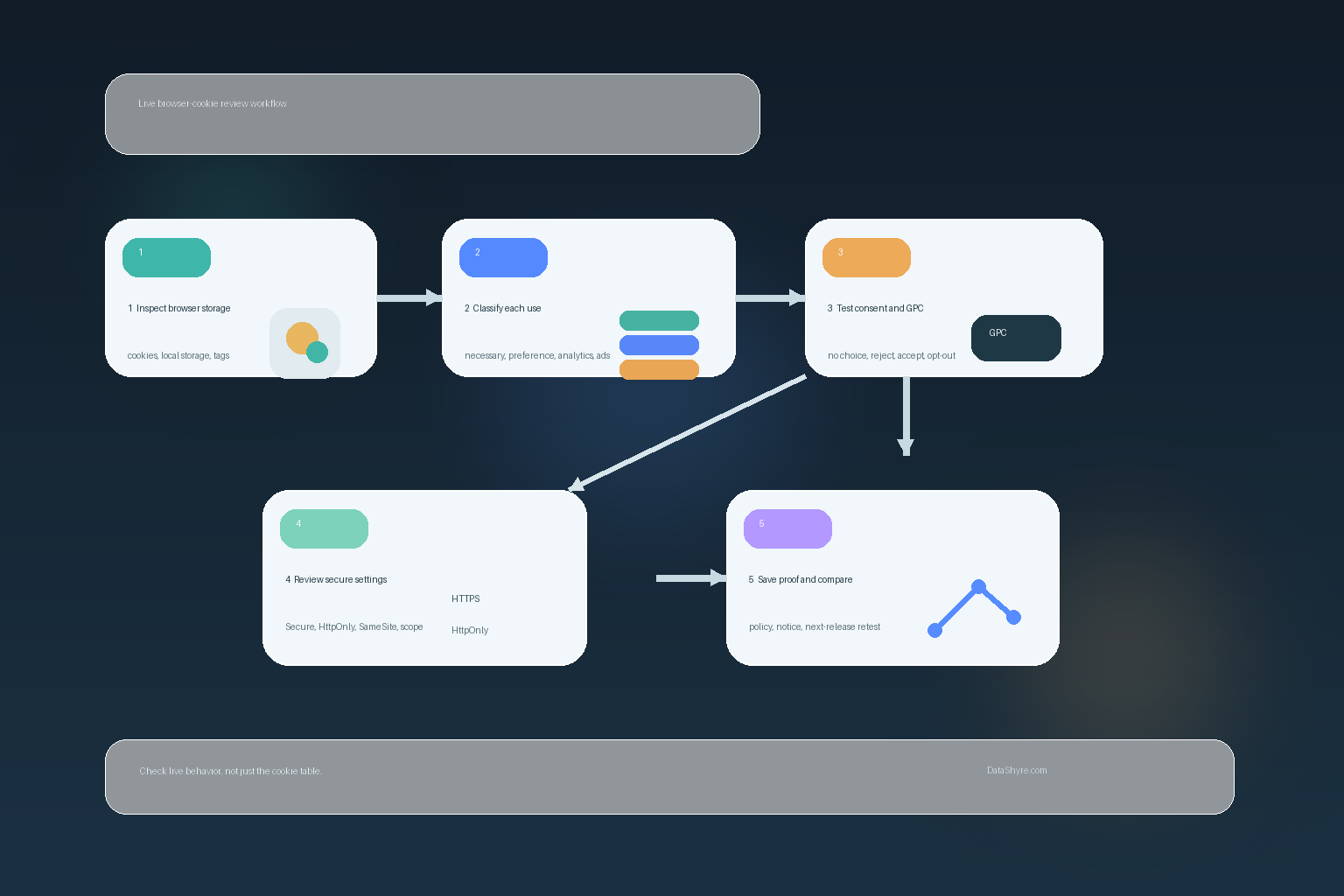
If I were auditing browser cookies this week, I would use this order:
- list every cookie and adjacent storage mechanism that appears before any user choice;
- classify each item as necessary, preference, analytics, advertising, or embedded-third-party behavior;
- compare Chrome and Firefox behavior instead of assuming one browser tells the whole story;
- inspect session versus persistent lifetimes and ask whether the duration matches the purpose;
- review sensitive cookies for
Secure,HttpOnly,SameSite, and overly broad scope; - test reject, accept, later withdrawal, and California GPC or opt-out behavior where relevant; and
- compare the live findings against the privacy policy, notice, and consent interface.
That sequence surfaces more truth than either a legal memo alone or a cookie-export spreadsheet alone.
FAQ
Are browser cookies the same as internet cookies?
Usually people use the terms almost interchangeably. Browser cookies emphasizes the browser-storage side of the mechanism, while broader explainers may use internet cookies to describe the same underlying concept in plainer language.
Are all browser cookies used for tracking?
No. Some browser cookies are there to keep a session alive, remember a preference, or help a site work properly. The higher-risk branch is usually optional analytics, advertising, profiling, or broader cross-context recognition.
Can a site reduce visible browser cookies and still keep tracking?
Yes. The ICO’s current guidance is explicit that the review now extends beyond cookies to other storage-and-access technologies. A site can store less in classic browser cookies while still using pixels, scripts, local storage, or other mechanisms to pursue a similar result.
Bottom line
The safest way to think about browser cookies in 2026 is not tiny files that only matter to banner lawyers.
It is one browser-level state mechanism inside a bigger runtime, security, and compliance system.
If you know what each cookie does, how long it lasts, how different browsers treat it, what security attributes protect it, and what changes after consent or opt-out, you are much closer to the truth.
The fastest way to judge browser cookies is to test it the way a broken deployment would expose it: before consent, after consent, and again after a stack change.
Sources
- MDN, Using HTTP cookies: https://developer.mozilla.org/en-US/docs/Web/HTTP/Guides/Cookies
- MDN, Set-Cookie header: https://developer.mozilla.org/en-US/docs/Web/HTTP/Reference/Headers/Set-Cookie
- MDN, Secure cookie configuration: https://developer.mozilla.org/en-US/docs/Web/Security/Practical_implementation_guides/Cookies
- Chrome for Developers, View, add, edit, and delete cookies: https://developer.chrome.com/docs/devtools/application/cookies/
- Mozilla Support, Third-party cookies and Firefox tracking protection: https://support.mozilla.org/en-US/kb/third-party-cookies-firefox-tracking-protection
- Mozilla Support, Total Cookie Protection and website breakage FAQ: https://support.mozilla.org/en-US/kb/total-cookie-protection-and-website-breakage-faq
- ICO, What are storage and access technologies?: https://ico.org.uk/for-organisations/direct-marketing-and-privacy-and-electronic-communications/guidance-on-the-use-of-storage-and-access-technologies/what-are-storage-and-access-technologies/
- ICO, How do we comply with the PECR rules?: https://ico.org.uk/for-organisations/direct-marketing-and-privacy-and-electronic-communications/guidance-on-the-use-of-storage-and-access-technologies/how-do-we-comply-with-the-pecr-rules
- California Department of Justice, California Consumer Privacy Act (CCPA): https://oag.ca.gov/privacy/ccpa